
VLANs (Virtual Local Area Networks) are the backbone of modern network security and organization. By logically segmenting a physical switch into multiple virtual ones, you prevent broadcast storms and improve security. However, with this segmentation comes a classic headache: “Why can’t my users talk to each other?”
In this guide, we’ll look at the most common VLAN troubleshooting scenarios you’ll face on the Network+ exam, and in the field.
1. The Anatomy of a VLAN Mismatch
Before we fix the problems, look at this typical network layout. The most common issues arise when the configuration on the switch doesn’t match the reality of the connected devices.
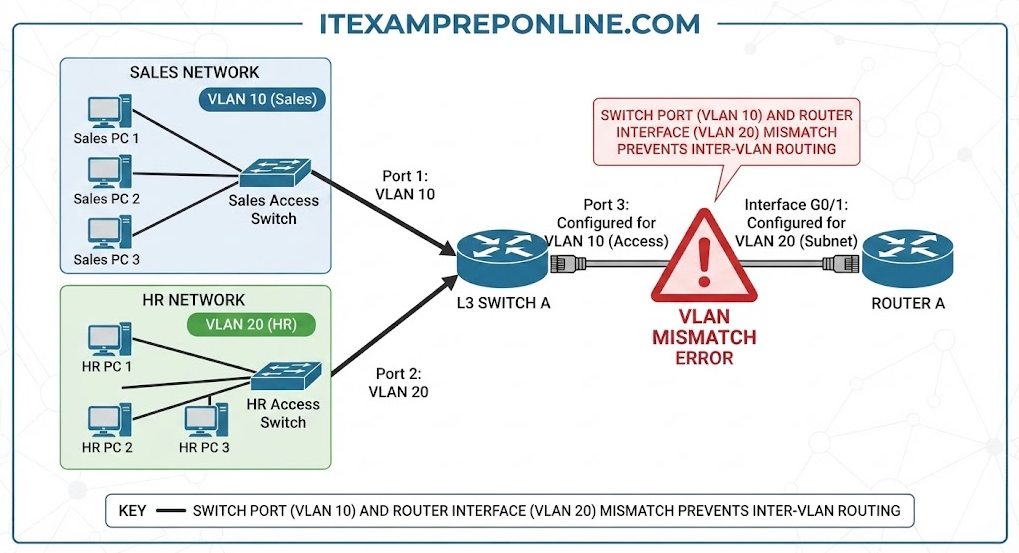
A VLAN mismatch is essentially a “communication barrier.” Even if the cables are perfect, if the switch believes a device belongs in the Sales department (VLAN 10) but the router or the device itself is configured for the HR subnet (VLAN 20), traffic will simply disappear into the ether.
2. Deep Dive: Top 3 Exam Scenarios
Scenario A: The “Access Port” Mismatch (Most Common)
The Symptom: A user moves their desk, plugs into a wall jack, and loses network connectivity.
- The Technical Cause: Switches act as Layer 2 devices. Each port on a switch is assigned to a specific VLAN. If a port is statically assigned to VLAN 20 and a PC in VLAN 10 is connected, the switch will essentially ignore the traffic or drop it because it doesn’t match the VLAN membership of that port.
- The Professional Fix: Always verify port membership with
show vlan brief. If you find a port in the wrong VLAN, reassign it using theswitchport access vlan [ID]command.
Scenario B: Trunk Port Negotiation Failure (802.1Q Issues)
The Symptom: Users in VLAN 10 can talk to each other, but cannot reach the gateway or resources across the building.
- The Technical Cause: Trunks are links that carry traffic for multiple VLANs. They use 802.1Q tagging to label frames so the receiving switch knows which VLAN a packet belongs to. If the Native VLAN does not match on both ends of the trunk, the switch creates a “mismatch,” security protocols trigger, and traffic is dropped.
- The Professional Fix: Ensure both ends of the trunk have matching Native VLANs. Run
show interfaces trunkto confirm both switches are successfully negotiating the connection.
Scenario C: The “Inter-VLAN Routing” Problem
The Symptom: Devices within their own VLAN work perfectly, but cannot reach the internet or resources in other VLANs.
- The Technical Cause: By design, VLANs are separate security boundaries. They cannot communicate without Layer 3 intervention. If you have multiple VLANs but no router (or a Layer 3 switch) configured to route between them, traffic will never cross the boundary.
- The Professional Fix: Implement a “Router-on-a-Stick” (a router connected to a trunk port) or a Layer 3 switch. You must create “sub-interfaces” on the router interface, each assigned to a specific VLAN ID.
3. Real-World Troubleshooting Checklist (The “Network+ Way”)
When you are stuck in an exam question or a real office, follow this methodical approach:
- Physical Layer: Is the cable patched in correctly? Does the interface show an “Up/Up” status?
- Verify Port Membership: Run
show vlan brief. Are you on the expected port? - Inspect Trunks: Run
show interfaces trunk. Are your VLANs allowed to pass, or are they being pruned (blocked)? - Check IP Configuration: Is the device using the correct Gateway? If the PC has a static IP in the wrong subnet, it will never reach the default gateway, regardless of VLAN settings.
- Test with Ping: Use
pingto test connectivity to the default gateway of the VLAN first. If that fails, the problem is local. If it succeeds, the problem is in the routing/trunking configuration.
4. Practice Question: Can You Spot the Fault?
Question: A user in the Sales department (VLAN 10) reports they cannot access the shared printer located in the same office. However, users in VLAN 20 have no issues. The network administrator verifies the switch port for the user is set to VLAN 10. What is the most likely cause?
- A) The trunk port is down.
- B) The user’s device is configured for a static IP in the wrong subnet.
- C) The router is missing the route to VLAN 20.
- D) The switch has a broadcast storm.
Correct Answer: B) The user’s device is configured for a static IP in the wrong subnet.
Explanation: In a real-world scenario, if users in other VLANs (like VLAN 20) are working correctly, the core infrastructure (trunks/routers) is functioning. A “port assigned to VLAN 10” confirms the switch is configured correctly. Therefore, the issue must be at the device (Layer 1/2 endpoint): a static IP that doesn’t match the VLAN’s IP scheme will always prevent communication.
Master Your Network+ Prep
- 🚀 Test your skills: Practice real-world scenarios with my CompTIA Network+ 6 Full Mock Exams.
- 📚 Study Tip: Always remember: VLAN Mismatches Port Configuration Error.
- 📺 Practice Tests Learning: Check out my YouTube channel for scenarios based questions for Network+.