
When studying for the CompTIA Network+ exam, understanding wireless security is an absolute must. In the early days of Wi-Fi, getting connected was simple, but security was practically non-existent. Today, securing wireless local area networks (WLANs) is a multi-layered defense mechanism designed to prevent unauthorized access, data eavesdropping, and sophisticated cyberattacks.
In this comprehensive guide, we will break down the evolution of wireless security protocols; from easily hackable legacy systems to modern enterprise-grade encryption standards; ensuring you understand how they work and what you need to know for your exam.
1. The Evolution of Wireless Security: Why We Needed Better Protocols
Radio waves do not stop at your office walls or front door; they bleed out into the public domain. Because wireless networks transmit data through the air via radio frequencies, anyone with a proper antenna and a packet analyzer can capture the traffic.
Without encryption, anyone within range could read your emails, passwords, and sensitive documents. To combat this, the Wi-Fi Alliance developed a series of security standards. However, as computing power increased and hackers found flaws in the mathematics behind these protocols, the industry had to evolve rapidly.
2. Breaking Down the Four Major Protocols
Here is how the security protocols evolved over time. You can use a timeline infografic right here to help readers visualize the transition:
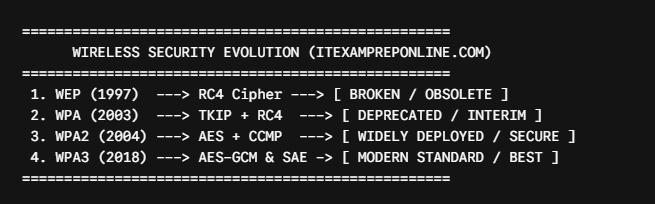
I. WEP (Wired Equivalent Privacy) — The Broken Legacy
- Era: Introduced in 1997 (Ratified 1999)
- Encryption Algorithm: RC4 (Rivest Cipher 4)
- The Core Vulnerability: WEP used a static encryption key that was shared among all users on the network. More critically, WEP reused Initialization Vectors (IVs) far too quickly. Because the IVs were short and predictable, hackers could capture enough data packets in a matter of minutes, analyze the duplicated keys, and crack the entire password.
- Exam Note: WEP is considered completely obsolete and insecure. If an exam question mentions WEP, the correct administrative response is always to upgrade immediately to a modern protocol.
II. WPA (Wi-Fi Protected Access) — The Interim Patch
- Era: Introduced in 2003 as a stopgap measure.
- Encryption Algorithm: TKIP (Temporal Key Integrity Protocol).
- The Core Vulnerability: WPA was designed to run on older hardware that originally used WEP through a simple firmware update. While TKIP dynamically changed the encryption keys per packet (fixing WEP’s static key flaw), it still relied heavily on the flawed RC4 algorithm underneath. Consequently, WPA was eventually cracked via cryptographic attacks and dictionary tools.
- Exam Note: Know that WPA was an interim solution using TKIP to replace WEP without requiring new enterprise hardware.
III. WPA2 (Wi-Fi Protected Access 2) — The Gold Standard for Years
- Era: Introduced in 2004 and mandatory for all Wi-Fi certified devices for over a decade.
- Encryption Algorithm: CCMP (Counter Mode with Cipher Block Chaining Message Authentication Code Protocol) powered by the AES (Advanced Encryption Standard) block cipher.
- Overview: WPA2 completely discarded the weak RC4 cipher and TKIP. AES-CCMP provided robust, military-grade encryption and data integrity. WPA2 comes in two primary modes:
- WPA2-Personal (PSK – Pre-Shared Key): Used in home or small office environments where everyone shares the exact same Wi-Fi password.
- WPA2-Enterprise (802.1X / EAP): Used in large corporate setups, requiring users to authenticate against a central RADIUS server with individual credentials.
- Exam Note: Be prepared for questions regarding KRACK (Key Reinstallation Attacks), which targeted the 4-way handshake in WPA2, highlighting the need for a stronger successor.
IV. WPA3 — The Modern Standard
- Era: Introduced in 2018 by the Wi-Fi Alliance.
- Encryption Algorithm: AES-GCM-256 (for Enterprise) and SAE (Simultaneous Authentication of Equals) for Personal mode.
- Overview: WPA3 is the current state-of-the-art wireless security protocol. It fixes the major weakness of WPA2-Personal (offline brute-force attacks against the 4-way handshake). With SAE (also known as Dragonfly handshake), even if an attacker captures the initial handshake over the air, they cannot guess your password offline because each connection uses a forward-secure protocol exchange. Furthermore, WPA3-Enterprise introduces 192-bit cryptographic strength for highly sensitive government, defense, and corporate networks.
- Exam Note: WPA3 enforces forward secrecy, meaning that even if an attacker compromises the main network password later, they cannot decrypt past recorded traffic.
3. Comparison Table: Quick Reference for the Exam
| Protocol | Primary Cipher | Key Management / Handshake | Security Status | Common Use Case |
| WEP | RC4 | Static Shared Key / Weak IVs | Completely Broken | Legacy equipment (Do not use) |
| WPA | RC4 + TKIP | TKIP Key Mixing | Deprecated / Insecure | Temporary stopgap (Obsolete) |
| WPA2 | AES (CCMP) | 4-Way Handshake (PSK / 802.1X) | Legacy / Widely Deployed | Standard enterprise and home networks |
| WPA3 | AES (GCM/CCMP) | SAE (Dragonfly Handshake) | Current Best Practice | Modern high-security deployments |
4. Real-World Troubleshooting Scenario
Scenario: A security audit at a corporate branch office reveals that legacy IoT (Internet of Things) devices and older smart thermostats refuse to connect to the primary corporate SSID because they do not support WPA3. The administrator needs to maintain high security for modern laptops while ensuring the IoT devices stay online.
- The Solution: Many modern enterprise access points support a WPA2/WPA3 Transition Mode (or Mixed Mode). This allows WPA3-capable client devices to connect using advanced SAE protection while simultaneously allowing legacy WPA2 devices to authenticate using standard AES-CCMP without compromising the entire network infrastructure’s integrity.
5. Scenario-Based Exam Practice Question
Question: A network administrator is configuring a new corporate wireless network that requires protection against offline dictionary attacks if an attacker intercepts the initial wireless handshake. Furthermore, the solution must provide individual user authentication via an external RADIUS server. Which configuration best satisfies these requirements?
- A) WPA2-Personal with TKIP
- B) WPA3-Enterprise
- C) WPA2-Enterprise with WEP fallback
- D) WPA3-Personal with a pre-shared key
Correct Answer: B) WPA3-Enterprise
Explanation:
- WPA3-Enterprise provides the highest level of security, utilizing 192-bit minimum security suites and robust authentication via 802.1X/EAP which integrates with a RADIUS server.
- Why not D: WPA3-Personal uses SAE to protect against offline attacks, but it relies on a single Pre-Shared Key (PSK) rather than individual user authentication via an external server.
- Why not A or C: WPA2-Enterprise uses individual logins, but WPA2 is vulnerable to specific dictionary and key installation flaws that WPA3 fixes, and WEP is entirely obsolete.
Master Your Network+ Prep
- 🚀 Test your skills: Practice real-world scenarios and protocol breakdowns with my CompTIA Network+ 6 Full Mock Exams.
- 📚 Recommended Reading: Keep the CompTIA Network+ N10-008 Cert Guide by Anthony Sequeira nearby for quick tables on wireless standards and encryption ciphers.
- 📺 Practice Tests Learning: Check out my YouTube channel for scenario based questions for Network+ .