In networking, the Transport Layer (Layer 4 of the OSI model) governs data delivery via two protocols: TCP and UDP. Additionally, you must understand when and why each is used.
This article will break down the TCP vs UDP differences. Additionally, it will provide real-world examples and show you how to identify them in exam questions.
1. The Contenders at a Glance
Before we dive deep, here is the quick comparison table that you should study and memorize for your exam.
| Feature | TCP (Transmission Control Protocol) | UDP (User Datagram Protocol) |
| Nature | Connection-Oriented | Connectionless |
| Reliability | High (Guaranteed Delivery) | Low (Best-Effort Delivery) |
| Acknowledgment | Yes (ACKs required) | No |
| Sequencing | Yes (Packets arrive in order) | No (Packets may arrive out of order) |
| Flow Control | Yes (Windowing) | No |
| Speed/Overhead | Slower (Higher overhead) | Faster (Lower overhead) |
| Error Checking | Yes (Checksum & retransmission) | Minimal (Checksum, discards error) |
| Typical Uses | Web browsing (HTTP/S), Email (SMTP/IMAP), File Transfer (FTP) | Streaming (Video/Audio), VoIP, Gaming, DNS, DHCP |
2. TCP: The Reliable Post Office (Connection-Oriented)
Think of TCP as sending a certified letter. You want to make sure the recipient gets it, and you need proof.
Key Characteristics:
- Connection-Oriented: Before sending data, TCP performs a “handshake” to establish a connection with the destination.
- Guaranteed Delivery: If a packet gets lost in transit, the receiver will ask for it to be re-sent (Acknowledgment/Retransmission).
- Ordered Delivery: Even if packets take different routes and arrive out of order, TCP will reassemble them in the correct sequence at the destination.
The TCP Three-Way Handshake (Memorize this!)
To establish a connection, TCP always follows this sequence:
- SYN: The client sends a “Synchronize” request to the server.
- SYN/ACK: The server replies with “Synchronize/Acknowledgment”.
- ACK: The client sends a final “Acknowledgment”.
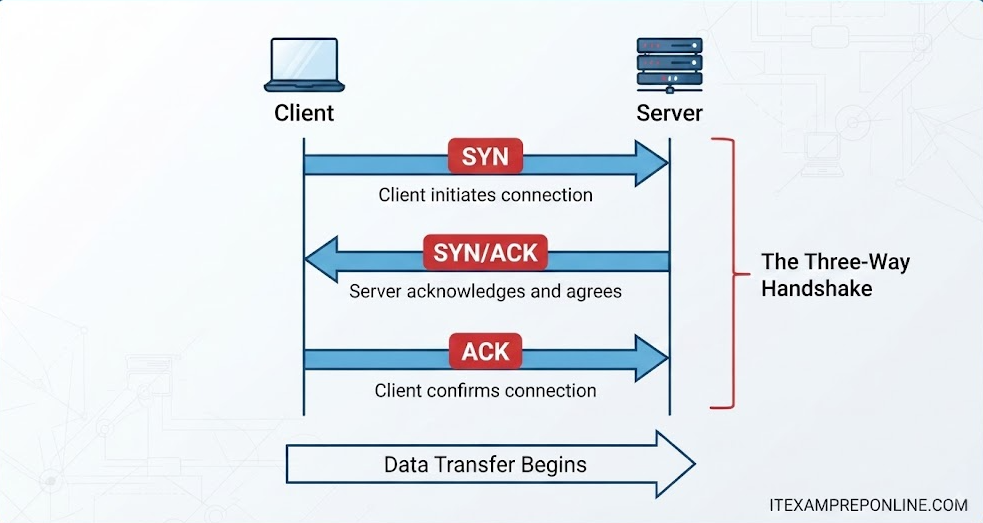
Once the handshake is complete, data transfer begins.
3. UDP: The Shouting Match (Connectionless)
Think of UDP as shouting information into a crowd. You don’t establish a connection, you don’t know who is listening, and you don’t care if they understood you—you just keep talking.
Key Characteristics:
- Connectionless: No handshake is performed before sending data. It just starts sending packets (datagrams).
- Best-Effort: It is unreliable. If a packet is dropped or corrupted, UDP does not resend it.
- Unordered: Packets may arrive at the destination in a different order than they were sent.
- Lightweight/Fast: Because it lacks the overhead of ACKs, retransmission, and sequencing, UDP is significantly faster.
4. Real-World Applications (Network+ Exam Focus)
The CompTIA Network+ exam loves scenario-based questions. Use this logic to choose the right protocol:
When to Use TCP (Reliability > Speed):
- Loading a Website (HTTP/S): You need every image and every line of text to load correctly.
- Downloading a File (FTP): You cannot have a corrupt file.
- Sending an Email (SMTP): An email is useless if parts of the message are missing.
When to Use UDP (Speed > Reliability):
- Streaming Video (Netflix/YouTube): If one video frame drops, it’s better to skip it than to pause and re-buffer.
- VoIP (Voice over IP) calls: If a millisecond of audio is lost, you might hear a “click,” but you don’t want the whole conversation to be delayed.
- Online Gaming: You need your character’s position updated instantly.
- DNS (Domain Name System): When your computer asks a DNS server for an IP address, it needs a super-fast, single-query/single-response.
5. Master Your Network+ Prep
Theory is essential, but passing the Network+ requires hands-on practice with exam-style questions.
- 🚀 Boost your prep: Get instant access to my CompTIA Network+ Exam Preparation. These practice questions will help you pass specifically on Transport Layer protocols, ensuring you’re ready for any exam scenario.
- 📚 Recommended Reading: Keep the CompTIA Network+ N10-008 Cert Guide by Anthony Sequeira on your desk.
- 📺 Visual Learning: Subscribe to my YouTube channel for deep-dive tutorials where I use Wireshark to capture live TCP and UDP traffic.