Passing the CompTIA Security+ (SY0-701 or latest version) exam is one of the most critical milestones for any IT professional looking to break into cybersecurity or solidify their foundational knowledge. Recognized globally and compliant with modern cybersecurity frameworks, Security+ proves that you possess the core technical and operational security functions required for risk management, incident response, network architecture defense, and cryptography.
However, because the exam tests both theoretical concepts and practical, hands-on problem-solving scenarios, simply memorizing definitions will not guarantee a passing score. You need an aggressive, structured study plan, the right mix of resources, and a disciplined approach to mastering complex domains.
In this comprehensive guide, we will break down an actionable 6-week study plan, essential resource picks, real-world troubleshooting insights, and exam-style practice questions to help you pass on your first attempt.
1. Understanding the Exam Structure and Objectives
Before opening a book or watching a single training video, you must understand the structure of the CompTIA Security+ exam. CompTIA exams are specifically designed to test your understanding of how and why security controls are deployed, forcing you to apply concepts rather than just recite textbook answers.
Key Exam Specifications:
- Question Format: Maximum of 90 questions.
- Question Types: Multiple-choice questions and Performance-Based Questions (PBQs). PBQs require you to configure simulated firewall rules, configure access control lists (ACLs), or analyze a live log file within a virtual command-line environment.
- Passing Score: 750 (measured on a scale of 100 to 900).
- Time Limit: 90 minutes.
Core Security+ Domain Weighting breakdown:
- General Security Concepts (~12%)
- Threats, Vulnerabilities, and Mitigations (~22%)
- Security Architecture (~18%)
- Security Operations (~28%)
- Security Program Management and Oversight (~20%)
2. The 6-Week Step-by-Step Study Plan
To digest this massive volume of technical material without burning out, a 6-week study schedule, dedicating roughly 10 to 15 hours per week, is the gold standard for working professionals and students alike.
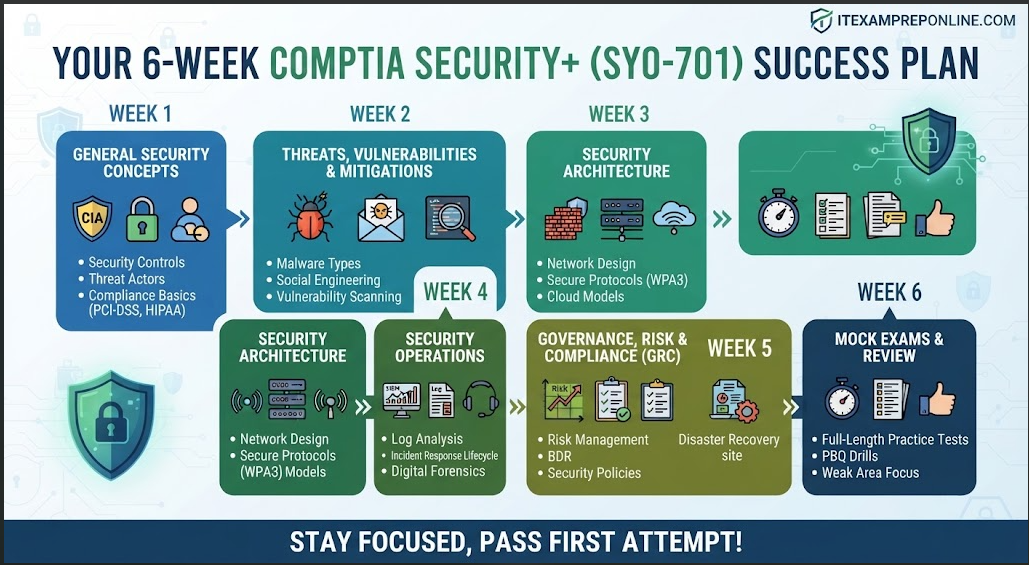
Week 1: General Security Concepts & Threat Landscapes
- Focus Areas: Master the CIA triad (Confidentiality, Integrity, Availability), Zero Trust architecture models, physical security controls, and different categories of threat actors (Advanced Persistent Threats, insider threats, hacktivists).
- Action Item: Build physical or digital flashcards for core acronyms. Do not skip basic compliance frameworks such as PCI-DSS, HIPAA, GDPR, and ISO standards.
Week 2: Threats, Vulnerabilities, and Mitigations
- Focus Areas: Conduct a deep dive into malware classifications (ransomware, trojans, rootkits, cryptominers), social engineering vectors (phishing, whaling, pretexting, watering hole attacks), vulnerability scanning methodologies, and threat intelligence feeds.
- Action Item: Review common application and system attack vectors. Learn how to recognize explicit Indicators of Compromise (IoCs) within system logs.
Week 3: Security Architecture & Infrastructure
- Focus Areas: Enterprise network security design, segmentation, firewalls, Virtual Private Networks (VPNs), Intrusion Detection and Prevention Systems (IDS/IPS), secure wireless protocols (like WPA3), and cloud security architecture (SaaS, PaaS, IaaS, and the shared responsibility model).
- Action Item: Study foundational cryptography concepts, symmetric vs. asymmetric encryption, hashing algorithms, digital certificates, and Public Key Infrastructure (PKI) life cycles.
Week 4: Security Operations & Incident Response
- Focus Areas: This is the heaviest domain on the exam. Focus heavily on security log analysis (SIEM tools, syslog, netflow), endpoint detection and response (EDR), the standardized incident response lifecycle (Preparation, Identification, Containment, Eradication, Recovery, and Lessons Learned), and digital forensics fundamentals (chain of custody, legal holds, and evidence preservation).
- Action Item: Practice reading sample raw log lines to identify behavioral anomalies or brute-force login patterns.
Week 5: Governance, Risk, and Compliance (GRC)
- Focus Areas: Risk management strategies (avoidance, transference, acceptance, and mitigation), business continuity planning and disaster recovery metrics (Recovery Point Objective [RPO], Recovery Time Objective [RTO], hot sites, cold sites), data privacy regulations, and mandatory security awareness training programs.
- Action Item: Understand fundamental risk calculation formulas, including Single Loss Expectancy (SLE), Annual Rate of Occurrence (ARO), and Annual Loss Expectancy (ALE).
Week 6: Mock Exams, PBQ Practice, and Final Review
- Focus Areas: Stop reading new material and start testing your knowledge under pressure. Take full-length, timed mock exams to condition your stamina for the 90-minute limit.
- Action Item: Thoroughly review every single question you answer incorrectly. Understand why the correct answer is right and why your selected answer was wrong. Practice interactive Performance-Based Questions until you feel completely comfortable with simulated network configurations.
3. Essential Study Resources (Books, Courses, and Labs)
Relying on a single resource when preparing for CompTIA Security+ is risky. A balanced and robust study stack typically includes a primary video course, a detailed technical reference book, and high-quality practice question banks.
A. Professional Video Courses & Mock Exams (Recommended)
Exam Simulation Stamina: CompTIA Security+ 6 Full Mock Exams (90 Questions Each) on Udemy
Why it helps: Simulates real testing pressure with full-length practice tests matching the exact format, question count, and difficulty level of the official CompTIA exam.
Domain-by-Domain Mastery:CompTIA Security+ Domain-by-Domain Complete Course on Udemy
Why it helps: Breaks down complex cybersecurity principles domain by domain, providing clear, structured explanations tailored specifically to the exam objectives.
B. Recommended Study Guides (Books)
- CompTIA Security+ Get Certified Get Ahead: SY0-701 Study Guide: Widely regarded by IT professionals as one of the most accessible and clear exam prep books available, translating dense technical standards into plain English.
- CompTIA Security+ Cert Guide by David Seidl: Excellent for deep-dive technical explanations, granular command-line references, and structured review quizzes at the end of every chapter.
C. Hands-On Labs and Practice Environments
- TryHackMe / Hack The Box: Invaluable platforms for getting hands-on command-line experience with fundamental security tools like Wireshark, Nmap, and basic log analysis frameworks, which directly helps tackle Performance-Based Questions.
4. Real-World Troubleshooting Scenario: Handling a Security Incident
On the Security+ exam, you will frequently be placed in the shoes of a Security Operations Center (SOC) analyst or a sysadmin tasked with reacting to an active breach.
Scenario: An enterprise organization notices unusual outbound traffic spikes originating from a core database server late at night. The traffic is communicating with an unknown external IP address using heavily encrypted channels. The SOC team suspects an active data exfiltration event in progress.
- Step 1 (Immediate Containment): The highest priority is network isolation. The administrator must disconnect the database server from the main production network (or apply strict, temporary firewall isolation rules) to stop ongoing data loss while keeping the machine powered on to preserve memory contents for forensic analysis.
- Step 2 (Identification & Analysis): Review system logs, active network connections using terminal commands like
netstator SIEM alert panels, and check for unauthorized user accounts, modified registry keys, or rogue scheduled tasks. - Step 3 (Eradication & Recovery): Purge the malware payload, patch the vulnerability or misconfiguration that allowed entry, restore clean system files from known-good isolated backups, and immediately force credential resets for all compromised accounts.
5. Scenario-Based Exam Practice Questions
Practice Question 1
Question: During an internal corporate security audit, an administrator discovers that a mobile workstation used by a remote employee was physically stolen from a public coffee shop. The laptop contained sensitive proprietary customer records, but the hard drive was fully encrypted using a hardware-based Cryptozoic-processor chip permanently integrated onto the motherboard. Which technology successfully prevented unauthorized physical extraction of the data from the drive?
- A) IDS (Intrusion Detection System)
- B) TPM (Trusted Platform Module)
- C) HSM (Hardware Security Module)
- D) NAC (Network Access Control)
Correct Answer: B) TPM (Trusted Platform Module)
Explanation:
- TPM (Trusted Platform Module) is a specialized cryptographic microchip physically installed on a computer’s motherboard designed to secure hardware operations through integrated cryptographic keys. It serves as the core hardware foundation behind full-disk encryption solutions like BitLocker.
- Why not C: An HSM (Hardware Security Module) is typically a heavy-duty enterprise server-grade device used to manage digital keys at scale, not a local laptop motherboard chip.
- Why not A or D: IDS detects network or system intrusions, and NAC controls network access permissions; neither protects data stored locally on a stolen physical hard drive.
Practice Question 2
Question: A security administrator is configuring a centralized authentication framework for an enterprise environment. The architecture requires that user credentials are encrypted end-to-end between the client authenticator and the authentication server, while leveraging UDP for transport and supporting robust attribute-based access controls. Which protocol should the administrator deploy?
- A) RADIUS (Remote Authentication Dial-In User Service)
- B) TACACS+ (Terminal Access Controller Access-Control System Plus)
- C) LDAP (Lightweight Directory Access Protocol)
- D) HTTP (Hypertext Transfer Protocol)
Correct Answer: B) TACACS+ (Terminal Access Controller Access-Control System Plus)
Explanation:
- TACACS+ encrypts the entire packet payload (not just the password field, unlike traditional RADIUS), relies on TCP, and separates authentication, authorization, and accounting functions, making it a preferred choice for administrative device security.
- Why not A: Standard RADIUS encrypts only the password portion during the authentication exchange and traditionally runs over UDP.
Master Your Security+ Prep
- 🚀 Test your skills: Practice real-world scenarios and domain-specific mock tests with my recommended exam prep bundles.
- 📚 Recommended Reading: Keep a comprehensive study guide nearby to cross-reference unfamiliar acronyms, compliance frameworks, and encryption standards.
- 📺 Scenario-Based Practice Tests on Youtube